

Showing posts with label TECH. Show all posts
Showing posts with label TECH. Show all posts
Wednesday, September 5, 2012

Sunday, August 19, 2012
Android 4.1, Jelly Bean

Android 4.1, Jelly Bean: The world's
most popular platform gets even better
Android 4.1, Jelly Bean, is the fastest and smoothest version
of Android yet. Jelly Bean improves on the simplicity and beauty of Android 4.0, and introduces a new Google
search experience on Android.
Fast & smooth
We put Android under a microscope, making
everything feel fast, fluid, and smooth. With buttery graphics and silky
transitions, moving between home screens and switching between apps is
effortless, like turning pages in a book.
More reactive and uniform touch responses mean
you can almost feel the pixels beneath as your finger moves across the screen.
Jelly Bean makes your Android device even more responsive by boosting your
device's CPU instantly when you touch the screen, and turns it down when you
don't need it to improve battery life.
 Simple, beautiful and
beyond smart
Simple, beautiful and
beyond smart

Expandable, actionable notifications.
Android has always put you in control when it comes
to staying notified and connected. Now you can take action directly from the
notifications shade. Late for a meeting? Email everyone to let them know.
Missed a call? Call them back in an instant. And because they’re expandable,
you can get an even deeper look into the things that matter most, like multiple
emails or photos on Google+.
Widgets work like magic.

With Jelly Bean it's now even easier to personalize your home
screen. As you place widgets on the screen, everything else automatically moves
to make room. When they're too big, widgets resize on their own. Interacting
with your favorite apps and customizing your home screen has never been easier.
Seamlessly take and share photos.
 Android 4.0, Ice Cream Sandwich, made snapping
photos super fast; Jelly Bean brings that same speed to the next step: viewing.
Just swipe over from camera to filmstrip view to instantly view the photos you
just took, and quickly swipe away the ones you don’t like. Now sharing — and
bragging — are a breeze.
Android 4.0, Ice Cream Sandwich, made snapping
photos super fast; Jelly Bean brings that same speed to the next step: viewing.
Just swipe over from camera to filmstrip view to instantly view the photos you
just took, and quickly swipe away the ones you don’t like. Now sharing — and
bragging — are a breeze.
 A smarter keyboard.
Android's dictionaries
are now more accurate, more relevant. The language model in Jelly Bean adapts
over time, and the keyboard even guesses what the next word will be before
you've started typing it. With improved text-to-speech capabilities, voice
typing on Android is even better; it works even when you don't have a data
connection, so you can type with your voice everywhere you go.
Accessibility.
 With Jelly Bean, blind users can use 'Gesture
Mode' to reliably navigate the UI using touch and swipe gestures in combination
with speech output. Jelly Bean also adds support for accessibility plugins to
enable external Braille input and output devices via USB and Bluetooth.
With Jelly Bean, blind users can use 'Gesture
Mode' to reliably navigate the UI using touch and swipe gestures in combination
with speech output. Jelly Bean also adds support for accessibility plugins to
enable external Braille input and output devices via USB and Bluetooth.
Android Beam.
 With Android Beam on Jelly Bean you can now easily share your
photos and videos with just a simple tap, in addition to sharing contacts, web
pages, YouTube videos, directions, and apps. Just touch two NFC-enabled Android
devices back-to-back, then tap to beam whatever's on the screen to your friend.
Instantly pair your Android phone or tablet to Bluetooth® devices like headsets
or speakers that support the Simple Secure Pairing standard by just tapping
them together – no more syncing or searching required.
With Android Beam on Jelly Bean you can now easily share your
photos and videos with just a simple tap, in addition to sharing contacts, web
pages, YouTube videos, directions, and apps. Just touch two NFC-enabled Android
devices back-to-back, then tap to beam whatever's on the screen to your friend.
Instantly pair your Android phone or tablet to Bluetooth® devices like headsets
or speakers that support the Simple Secure Pairing standard by just tapping
them together – no more syncing or searching required.
The new Google experience
on Android

The best of Google
just got better on Android. The search experience in Jelly Bean has a new
look-and-feel, and has faster and more natural Voice Search. And Google Now
brings you just the right information, before you even ask.
 A new look for Search.
Android has search at its core. With Jelly Bean, a
redesigned experience uses the power of the Knowledge Graph to show you search results in a richer
way. It's easier to quickly get answers and explore and browse search results.
Voice Search.
 Sometimes you'd rather just speak your search
query. Or just ask a question. Android lets you search the web with your voice,
and it's convenient for getting quick answers on the fly. It speaks back to you
and is powered by the Knowledge Graph, bringing you a precise answer if it
knows it, and precisely ranked search results, so you can always find out more.
Sometimes you'd rather just speak your search
query. Or just ask a question. Android lets you search the web with your voice,
and it's convenient for getting quick answers on the fly. It speaks back to you
and is powered by the Knowledge Graph, bringing you a precise answer if it
knows it, and precisely ranked search results, so you can always find out more.
Google Now brings you
just the right information at just the right time.
Google Now tells you
today's weather before you start your day, how much traffic to expect before
you leave for work, when the next train will arrive as you’re standing on the
platform, or your favorite team's score while they’re playing.

And the best part? All
of this happens automatically. Cards appear throughout the day at the moment
you need them.
Go to source page Click here
Apollo 11
 Crew: Aldrin, Armstrong, Collins. First manned
lunar landing. The end of the moon race and public support for large space
programs. The many changes made after the Apollo 204 fire paid off; all went
according to plan, virtually no problems. Backup crew: Anders, Haise, Lovell.
Crew: Aldrin, Armstrong, Collins. First manned
lunar landing. The end of the moon race and public support for large space
programs. The many changes made after the Apollo 204 fire paid off; all went
according to plan, virtually no problems. Backup crew: Anders, Haise, Lovell.


First landing on moon. Apollo 11 (AS-506)
- with astronauts Neil A. Armstrong, Michael Collins, and Edwin E. Aldrin, Jr.,
aboard - was launched from Pad A, Launch Complex 39, KSC, at 9:32 a.m. EDT July
16. The activities during earth-orbit checkout, translunar injection, CSM
transposition and docking, spacecraft ejection, and translunar coast were
similar to those of Apollo 10.
 At 4:40 p.m. EDT July 18, the crew began a
96-minute color television transmission of the CSM and LM interiors, CSM
exterior, the earth, probe and drogue removal, spacecraft tunnel hatch opening,
food preparation, and LM housekeeping. One scheduled and two unscheduled
television broadcasts had been made previously by the Apollo 11 crew.
At 4:40 p.m. EDT July 18, the crew began a
96-minute color television transmission of the CSM and LM interiors, CSM
exterior, the earth, probe and drogue removal, spacecraft tunnel hatch opening,
food preparation, and LM housekeeping. One scheduled and two unscheduled
television broadcasts had been made previously by the Apollo 11 crew.
The spacecraft entered lunar orbit at 1:28 p.m.
EDT on July 19. During the second lunar orbit a live color telecast of the
lunar surface was made. A second service-propulsion-system burn placed the
spacecraft in a circularized orbit, after which astronaut Aldrin entered the LM
for two hours of housekeeping including a voice and telemetry test and an
oxygen-purge-system check.
At 8:50 a.m. July 20, Armstrong and Aldrin reentered
the LM and checked out all systems. They performed a maneuver at 1:11 p.m. to
separate the LM from the CSM and began the descent to the moon. The LM touched
down on the moon at 4:18 p.m. EDT July 20. Armstrong reported to mission
control at MSC, "Houston, Tranquillity Base here - the Eagle has
landed." (Eagle was the name given to the Apollo 11 LM;
the CSM was named Columbia
Aldrin joined Armstrong on the surface of the
moon at 11:15 p.m. July 20. The astronauts unveiled a plaque mounted on a strut
of the LM and read to a worldwide TV audience, "Here men from the planet
earth first set foot on the moon July 1969, A.D. We came in peace for all
mankind." After raising the American flag and talking to President Nixon
by radiotelephone, the two astronauts deployed the lunar surface experiments
assigned to the mission and gathered 22 kilograms of samples of lunar soil and
rocks. They then reentered the LM and closed the hatch at 1:11 a.m. July 21.
All lunar extravehicular activities were televised in black-and-white.
Meanwhile, Collins continued orbiting moon alone in CSM Columbia
The Eagle lifted off from the
moon at 1:54 p.m. EDT July 21, having spent 21 hours 36 minutes on the lunar
surface. It docked with the CSM at 5:35 p.m. and the crew, with the lunar
samples and film, transferred to the CSM. The LM ascent stage was jettisoned
into lunar orbit. The crew then rested and prepared for the return trip to the
earth.
The CSM was injected into a trajectory toward
the earth at 12:55 a.m. EDT July 22. Following a midcourse correction at 4:01
p.m., an 18-minute color television transmission was made, in which the
astronauts demonstrated the weightlessness of food and water and showed shots
of the earth and the moon.
At 12:15 p.m. EDT July 24 the Apollo
11's command module Columbiasplashed down in the
mid-Pacific, about 24 kilometers from the recovery ship U.S.S. Hornet.
Following decontamination procedures at the point of splashdown, the astronauts
were carried by helicopter to the Hornetwhere they entered a mobile
quarantine facility to begin a period of observation under strict quarantine
conditions. The CM was recovered and removed to the quarantine facility. Sample
containers and film were flown to Houston
All primary mission objectives and all detailed
test objectives of Apollo 11were met, and all crew members remained
in good health.
Official NASA Account of the Mission
At 9:32 a.m. Eastern daylight time on July 16,
1969, Apollo 11 left Launch Complex 39A at Kennedy Space
Center Sea of Tranquility
"We'll get to the details of what's around
here, but it looks like a collection of just about every variety of shape,
angularity, granularity, about every variety of rock you could find. . . .
There doesn't appear to be too much of a general color at all. However, it
looks as though some of the rocks and boulders, of which there are quite a few
in the near area, it looks as though they're going to have some interesting
colors to them. . . . "
After giving Houston
"The area out the left-hand window is a
relatively level plain cratered with a fairly large number of craters of the 5-
to 50-foot variety, and some ridges - small, 20, 30 feet high, I would guess,
and literally thousands of little 1- and 2-foot craters around the area. We see
some angular blocks out several hundred feet in front of us that are probably 2
feet in size and have angular edges. There is a hill in view, just about on the
ground track ahead of us. Difficult to estimate, but might be half a mile or a
mile. "
Armstrong and Aldrin then started preparing
their spacecraft for takeoff, setting up critical systems to be ready in case
something happened and they had to leave the lunar surface quickly. A short
break in this activity gave Armstrong a chance to pass along more information
about the landing site:
". . . The local surface is very comparable
to that we observed from orbit at this sun angle, about 10 degrees sun angle,
or that nature. It's pretty much without color. It's . . . a very white, chalky
gray, as you look into the zero-phase line [directly toward the sun]; and it's
considerably darker gray, more like . . . ashen gray as you look out 90 degrees
to the sun. Some of the surface rocks in close here that have been fractured or
disturbed by the rocket engine plume are coated with this light gray on the
outside; but where they've been broken, they display a dark, very dark gray
interior; and it looks like it could be country basalt. "
Setting up the spacecraft systems took another
hour and a half to complete; then they were ready to get out and explore. The
flight plan called for them to eat and then rest for four hours, but Aldrin
called Mission Control to recommend starting their surface exploration in about
three hours' time. Houston
 While Armstrong and Aldrin tended to their
postlanding chores, Mike Collins, orbiting 60 nautical miles (112 kilometers)
overhead in the command module
While Armstrong and Aldrin tended to their
postlanding chores, Mike Collins, orbiting 60 nautical miles (112 kilometers)
overhead in the command module
Getting ready to leave the lunar module took
longer than the crew had anticipated. It was after 9:30 p.m. in Houston
Armstrong made a cursory inspection of the lunar
module and reported his reactions to the new environment. Aldrin then lowered a
camera on the lunar equipment carrier - a clothesline and pulley arrangement
that seemed out of place in the high-technology environment of Apollo - which
Armstrong immediately began using. Mission Control reminded him to scoop up the
contingency sample, which he did. "I'll try to get a rock in here. Just a
couple." He noted that the collecting tool met resistance after penetrating
a short distance into the surface material. He then stowed the sample in a bag
that he tucked into a pocket of his suit. To the scientists on earth he
remarked, "Be advised that a lot of the rock samples out here, the hard
rock samples, have what appear to be vesicles in the surface. Also, I am
looking at one now that appears to have some sort of phenocryst."
Aldrin then joined Armstrong on the surface, and
they spent the next several minutes inspecting the landing craft and reporting
on its condition, adjusting to the low lunar gravity and trying various ways of
getting around on the surface. After a brief commemorative ceremony (reading
the plaque attached to the lunar module) and a short conversation with
President Richard Nixon, they began unloading and emplacing the scientific
instruments and collecting samples. They supplemented earth's limited
television view of their activities with descriptions of what they were seeing
and doing. On a couple of occasions they acted like field geologists. Aldrin
reported that he saw a rock that sparkled "like some kind of
biotite," but he "would leave that to further analysis." After
closely examining some rounded boulders near the spacecraft, Armstrong said
they looked "like basalt, and they have probably two percent white
minerals in them. . . . And the thing that I reported as vesicular before, I
don't believe that any more. . . . they look like little impact craters where
BB shot has hit the surface."
The geologists in Houston Houston
Back inside the lunar module, Armstrong and
Aldrin removed their lunar surface suits and portable life-support systems and
used up their remaining film. Houston
Next morning Armstrong, Aldrin, and Collins
spent most of their time setting up Eagle and Columbia
Liftoff and rendezvous went smoothly. When the
two spacecraft were locked together Collins cracked Columbia's oxygen supply
valve and Aldrin opened the lunar module's vent valve, to create a gas flow
into the LM when the hatches were opened - part of the procedure to minimize
back-contamination-while Aldrin and Armstrong vacuumed the lunar dust from
their suits as best they could. Their vacuum cleaner, a brush attached to the
exhaust hose of the LM suit system, was not very powerful and the tenacious
dust came off only with difficulty. There was not nearly as much loose dust in
the lunar module as they had expected when they returned from the surface;
evidently it stuck tightly to whatever it touched. They passed the rock boxes
and other items over to Collins and then clambered into the command module,
where they removed their suits and stowed them in the bags provided. After
jettisoning the lunar module and straightening up the command module, the three
astronauts settled in for an uneventful trip back to earth.
 In the early morning hours of July 24, 8 days, 3
hours, 18 minutes, and 18 seconds after leaving
In the early morning hours of July 24, 8 days, 3
hours, 18 minutes, and 18 seconds after leaving
Meanwhile, recovery crews brought Columbia Hawaii ,
and thence to Houston
AKA:
Columbia/Eagle.
Location: National Air andSpace
Museum
First Launch: 1969.07.16.
Last Launch: 1969.07.24.
Duration: 8.14 days.
Location: National Air and
First Launch: 1969.07.16.
Last Launch: 1969.07.24.
Duration: 8.14 days.
Go to source page Click here
Apple iPhone 4S

The Same Premium Design
The iPhone 4S is largely identical in design to the iPhone 4, which, in my opinion, isn’t necessarily a bad thing. It took a bit of time for me to get used to the iPhone 4’s slightly rectangular shape when I reviewed it last year. I grew to appreciate its aesthetic, however, which is both distinctly Apple and different from the pack of other high-end smartphones. The overall design exudes elegance--from the
rounded, individual volume up and down buttons to the ring/silent switch and
the power/sleep button up top. Like last year's black iPhone review unit, the
face and back are made of glass that is specially treated to withstand
scratches and oily fingers, according to Apple. Despite the company's claims,
though, I found the front and back of that earlier unit covered with
fingerprints after only a couple of hours of use. This year, I got a white
review unit and found fingerprints to be less of an issue.
The overall design exudes elegance--from the
rounded, individual volume up and down buttons to the ring/silent switch and
the power/sleep button up top. Like last year's black iPhone review unit, the
face and back are made of glass that is specially treated to withstand
scratches and oily fingers, according to Apple. Despite the company's claims,
though, I found the front and back of that earlier unit covered with
fingerprints after only a couple of hours of use. This year, I got a white
review unit and found fingerprints to be less of an issue.I have to give credit to Apple every time a new iPhone comes out for making the unboxing experience such a treat for consumers. The packaging is sleek and minimalist, free of any gaudy carrier or app branding. When you slide open the box, you’re not greeted by thick heavy phone manuals that you’ll end up tossing in the garbage. The iPhone 4S seems more like a luxury item than just a mobile phone. Competing phone manufacturers should pay attention.
And the Same Gorgeous Display
 Like its predecessor, the iPhone 4S has a
3.5-inch, 960-by-640-pixel IPS
display. When you compare the 4 and 4S displays to the 3GS, you’ll notice a
huge difference. Whereas the iPhone 3GS's text--in the menus, in apps, or on
Web pages--appears thick, fuzzy, and undefined, the iPhone 4's text is razor
sharp, even when enlarged (as we tried doing when viewing a PDF).
Like its predecessor, the iPhone 4S has a
3.5-inch, 960-by-640-pixel IPS
display. When you compare the 4 and 4S displays to the 3GS, you’ll notice a
huge difference. Whereas the iPhone 3GS's text--in the menus, in apps, or on
Web pages--appears thick, fuzzy, and undefined, the iPhone 4's text is razor
sharp, even when enlarged (as we tried doing when viewing a PDF).The "Retina display"--so named because it surpasses the number of pixels that the human retina can process--also greatly improves the sharpness, clarity, and visible detail of images. I compared it to the Samsung Galaxy S II’s Super AMOLED Plus display as well as the HTC Sensation’s Super LCD display and found that I preferred the colors and sharpness of the iPhone over the other phones. The iPhone display fades in bright sunlight, however, whereas the other phones' screens were much easier to see.
iOS5: Good, not Groundbreaking
 When iOS 5 debuted, I tweeted that it fixed
just about everything that annoyed me about iOS 4. I was disappointed, however,
by the lack of innovation in the update. Features like tabbed browsing, a
single view for notifications, and the ability to use the volume rocker as a
camera shutter button are long-standing Android features. Still, iOS 5 works
well, runs smoothly, and is an overall strong update, and that’s really what’s
most important.
When iOS 5 debuted, I tweeted that it fixed
just about everything that annoyed me about iOS 4. I was disappointed, however,
by the lack of innovation in the update. Features like tabbed browsing, a
single view for notifications, and the ability to use the volume rocker as a
camera shutter button are long-standing Android features. Still, iOS 5 works
well, runs smoothly, and is an overall strong update, and that’s really what’s
most important.We’ve discussed the new features of iOS 5 elsewhere, so I’ll only highlight a few of my favorite updates. The big news here is that you can finally update your iPhone (or iPad) over the cloud--you don’t need to connect it to your PC. Another welcome change is the update to notifications. When your phone is locked, you’ll see notifications on the lock screen. When you unlock your phone, they disappear. If you're already logged into your phone, the notification will pop up on your screen. You can see all of your notifications in a single view in the very Android-esque Notifications Center. If you're using your phone, notifications will appear as a pop-up at the top of the screen, then disappear. To see all notifications, you simply swipe your finger down from the top of the screen. Your notifications are sorted by app and category. At the top, you’ll also see widget-like stock and weather updates.
In mail, you can now add rich formatting, like bold and italic text, to messages, along with being able to indent text. Mail now has a built-in dictionary as well. Another highlight is the iMessage app, which lets you send messages to any iOS device, regardless of whether it has SMS support.
Excellent Camera, but Not #1
When Apple says that the iPhone 4S camera has 60 percent more pixels than the iPhone 4 camera, it means that an 8-megapixel camera is technically 160 percent of the resolution of a 5-megapixel camera. So really, it doesn’t translate directly to improved image quality, as more megapixels aren't an indicator of better image quality on small-sensored cameras. The higher megapixel count does mean that you'll be able to print out images at a bigger size without losing resolution, or to crop images without the cropped area losing resolution.
We did a head-to-head subjective lab test of the iPhone 4S’s camera versus a heap of Android phones including the T-Mobile myTouch Slide, which got top scores in our last Android phone camera roundup. The otherAndroid phones included the Samsung Galaxy S II, the T-Mobile MyTouch 4G Slide, the Motorola Droid Bionic, and the HTC Sensation 4G.
 We also tested a couple of other devices
alongside these smartphones. To see how much the iPhone 4S's new camera has
improved over the previous version, we included last year's Apple
iPhone 4 (the black one) in our test group. And for a control subject, we
used a stand-alone camera--the Nikon
Coolpix P300--to see how the best phone cameras compared with a
well-respected pocket camera.It was a close call for overall image
quality, but the iPhone 4S ranked third in our tests, below the undefeated
myTouch 4G Slide and the Samsung Galaxy S II,In my own casual hands-on use, I
found the iPhone 4S’s 8-megapixel camera to be a huge improvement over the
iPhone 4’s. My outdoor photos looked gorgeous with bright, yet natural colors
and sharp detail. Lower-light photos weren’t as good; while the flash certainly
helps, it does give people a strange color tone.
We also tested a couple of other devices
alongside these smartphones. To see how much the iPhone 4S's new camera has
improved over the previous version, we included last year's Apple
iPhone 4 (the black one) in our test group. And for a control subject, we
used a stand-alone camera--the Nikon
Coolpix P300--to see how the best phone cameras compared with a
well-respected pocket camera.It was a close call for overall image
quality, but the iPhone 4S ranked third in our tests, below the undefeated
myTouch 4G Slide and the Samsung Galaxy S II,In my own casual hands-on use, I
found the iPhone 4S’s 8-megapixel camera to be a huge improvement over the
iPhone 4’s. My outdoor photos looked gorgeous with bright, yet natural colors
and sharp detail. Lower-light photos weren’t as good; while the flash certainly
helps, it does give people a strange color tone.
I’ve never been a fan of the iPhone camera's user interface. It is clean and simple, but a little too simple. You can’t tweak camera settings, like white balance, for example, and it only offers you one other shooting mode, HDR (high dynamic range). The myTouch 4G Slide lets you pick from many different modes, like Macro, Night, and Action modes. I do like the new grid option in iOS 5, however, which uses a bit of augmented reality to help you take level photos.
While I’m pleased with the camcorder boost to 1080p, I don’t like the fact that you can only capture video in 1080p. Why isn’t there an option to record in a smaller size? True, 1080p looks better than 720p, but you might not want to always record video in such a high resolution. For example, have you ever tried uploading a minute-long 1080p video to YouTube over 3G? It is excruciatingly slow. Uploading over LTE 4G, on the other hand, is an entirely different (meaning speedier) experience.
Every single Android phone I’ve ever tried lets you switch between video resolutions. This is yet another reason why I prefer the Android camera interface (the native and a few of the manufacturer-added interfaces) to the iPhone’s.
Performance: Data Speeds, Call Quality
According to Apple, data speeds for the iPhone 4S are double those for the iPhone 4, at 5.8 megabits per second for uploads and 14.4 mbps for downloads. The iPhone 4S can intelligently switch between two antennas for even better call quality, as well as faster download speeds. Using the FCC-approved Ookla app for measuring download and upload speeds, I tested the iPhone 4S over AT&T’s network in various parts of San Francisco. In the three areas I tested (The Mission, South of Market and Russian Hill), I averaged 0.38 megabits per second for download speeds and 0.21 mbps for upload speeds. This is a far cry from Apple’s claimed speeds. But at last, the iPhone goes dual-core.
Again, Apple is playing a bit of catch-up here; we saw the first dual-core
phones all the way back in January. Still, having the A5 is better than getting
no processor upgrade at all. The A5 is the same chip found in Apple's iPad 2,
which is a very good thing; when we reviewed the iPad 2, we noted the zippy
scrolling in the browser, as well as the speed when we used iTunes and quickly
navigated through various menus and galleries.
But at last, the iPhone goes dual-core.
Again, Apple is playing a bit of catch-up here; we saw the first dual-core
phones all the way back in January. Still, having the A5 is better than getting
no processor upgrade at all. The A5 is the same chip found in Apple's iPad 2,
which is a very good thing; when we reviewed the iPad 2, we noted the zippy
scrolling in the browser, as well as the speed when we used iTunes and quickly
navigated through various menus and galleries.As you’d expect, iPhone 4S is equally as speedy. Dual-core doesn’t necessarily mean double the speed, but you can see the difference between the two chips the most in video, gaming, and Web browsing. In our SunSpider JavaScript benchmark results, the 4S had a faster page loading time than the T-Mobile Samsung Galaxy S II and the Motorola Droid Bionic, both of which have dual-core chips.
Call quality was a bit on the disappointing side. My friends’ voices sounded hollow and unnatural. One of my friends reported that I sounded as if I were in a tunnel, and another reported that they could hear some background noise, but it wasn’t too distracting. I didn’t experience any dropped calls, however. I even tested the iPhone in a notorious cell phone deadzone in San Francisco (a street in Hayes Valley). Data speeds were sluggish, but I was able to carry a full conversation without losing the signal. The iPhone 4S’s new antenna technology seems to solve any “you’re holding it wrong” antenna issues.
We’re still conducting our battery life tests and will update this review once we get those scores in. In my own use, I didn’t notice much of a difference between the battery life of the iPhone 4 and the 4S.
Siri: Your Sometimes Helpful Personal Assistant

Siri is pretty good at understanding everything you say to it (Siri has no gender, FYI), but try to speak clearly. I also found that there are certain words it just can’t understand--“plantains,” for example. I do wish that the phone had a text option for situations like this. Being able to spell out the word to Siri is much easier than yelling “plantains! plan-tains!” into the iPhone over and over again. Siri is still in beta, however, so hopefully some of these minor annoyances will be fixed.
Bottom Line
As the phone editor at PCWorld, I get this question a lot: “Should I get an iPhone--or something else?” The “something else” usually translates to the latest and greatest Android phones. This question is hard to answer because it truly depends on what you’re looking for from your phone. Is this your first smartphone ever? You’ll probably find that the iPhone 4S has less of a learning curve. Are you a tech tweaker? You’ll probably benefit from the deeper customization options of Android. Want to try something completely different? Give Windows Phone 7 a test drive. If you currently own an iPhone 3GS and are due for an upgrade, going for the iPhone 4S is a no-brainer. If you currently own the iPhone 4, however, I’d recommend holding out for the next-generation iPhone. True, the camera and overall speediness have improved, and Siri is a neat feature, but otherwise the upgrade is incremental. You’re probably pretty happy with your iPhone 4’s camera and performance, so the upgrades might not justify the cost. Finally, if you’re looking into buying your first smartphone and want an iPhone, go for the less expensive iPhone 4.Go to source page Click here
Friday, August 17, 2012
Lamborghini 50th anniversary celebration
 Automobili Lamborghini SpA was founded back in 1963 by the late Ferruccio
Lamborghini in an attempt to build the best GT car on the market, and it must
be said the 350 GT came very close to that vision, it was a comfortable, high
speed, V12 Gran Turismo car, the first production model to be built at the then
brand new factory in Sant'Agata ... over the years many masterpieces have left
the doors while the Lamborghini models evolved into some of the most exotic
super cars available on the market, perhaps not the vision Ferruccio had in
mind back in the Sixties, but there is no question about the fact the legendary
Miura made the Lamborghini name a worldwide commodity.
Automobili Lamborghini SpA was founded back in 1963 by the late Ferruccio
Lamborghini in an attempt to build the best GT car on the market, and it must
be said the 350 GT came very close to that vision, it was a comfortable, high
speed, V12 Gran Turismo car, the first production model to be built at the then
brand new factory in Sant'Agata ... over the years many masterpieces have left
the doors while the Lamborghini models evolved into some of the most exotic
super cars available on the market, perhaps not the vision Ferruccio had in
mind back in the Sixties, but there is no question about the fact the legendary
Miura made the Lamborghini name a worldwide commodity.After the Miura we saw cars like the Countach emerge from Sant'Agata ... probably the most featured super car on bedroom posters in the Eighties, in the Nineties the Diablo took over for about a decade until the Murciélago was introduced back in 2001 ... to last another decade in various evolutions ... in 2011 Lamborghini made everybody open their eyes wide to see the new V12 flagship; the Aventador LP700-4 ... a near revolution among Lamborghini fans, and a massive success ... in less than 18 months over 1,000 units were built.
So in 2013 Automobili Lamborghini SpA will be 50 years on the high end car market, time to celebrate, and we are sure something big will be organized in and around Sant'Agata ... but at the moment the official statements are still silent, there are no details yet about what is going to happen in 2013 to celebrate half a century of Raging Bulls.
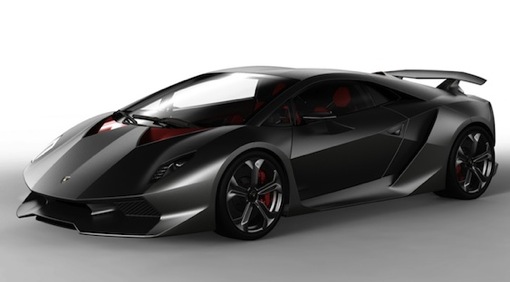
We did however get a press release stating Automobili Lamborghini SpA will reveal a few details at the 2012 edition of the Pebble Beach Concours d'Elegance during a press conference in the Quail, a motorsports gathering and the adjoining Concorso Italiano event where CEO Stephan Winkelmann will also show both the Urus and the Sesto Elemento concept cars for the first time in the United States.
For just about every anniversary before Lamborghini made a special model to celebrate, first up was the 1988 Countach 25th Anniversary edition, intended as a limited edition but with the delays in the unveil of the Diablo the 25th Anniversary Countach was built quite a lot. For 1993, the 30th anniversary Lamborghini did built something very special; the Diablo SE30, which was presented in a stunning 30th Anniversary Lavendar shade over a blue alcantara interior ... only 150 were built in total, all numbered while several were converted into a Jota edition, making the Diablo SE30 a very rare, highly sought after model these days.
In 2003 the next celebration model was released, now based on the Murciélago it was called the 40th Anniversary model, a production run of only 50 units this time, all finished in a stunning Verde Artemis shade (Jade green pearl metallic) and wearing several carbon fiber finished body parts that were black on the regular Murciélago. Also inside the 40th edition was special with an absolutely stunning combination of white leather and in an asymmetrical design with the driver's side upholstered in Grigio Syrius (dark grey) perforated leather and the passenger's side covered in smooth black leather.
So will we be seeing a 50th Anniversary limited edition model in 2013? I'm almost certain we will, and if the past is anything to go by it will be based on the current flagship; the Aventador. We've seen the Aventador Jota in Geneva this year, and rumor has it the MY2013 edition of the Aventador will be shown in Paris later this year together with the production version of the Sesto Elemento, only 20 to be built and available at a staggering 2,2 Million Euro each ... which leaves three other options for the 2013 Geneva Auto Show : either the Aventador Roadster, the Gallardo successor ... or an Aventador Anniversario edition.
At the moment there are still delays in the delivery of the Aventador LP700-4 due to the earthquakes in Italy, so adding the Roadster onto the already backlogged production line could be a problem ... so I fear we won't be seeing the open top Aventador in Geneva. The Gallardo successor could be making a debut in Geneva, we haven't seen any spy shots yet of the car being tested on the open road, but that only means Lamborghini is good at keeping it a secret ... so I vote for an Aventador 50th Anniversary edition.
 |
| Aventador |
Now why would I come up with a carbon fiber bodywork ... in fact I've been asking several of the well-known model makers that release the Aventador in 1/18 if a clear carbon model is in the pipeline, one online shop even listed it ... for a while. It seems Automobili Lamborghini SpA is declining every request for a license to build a carbon fiber Aventador scale model ... there must be a reason for that right?
So my guess is that Automobili Lamborghini SpA has plans for an Aventador model that boasts an unpainted bodywork showing a stunning carbon fiber weave ... either glossy or mat, both would be an instant hit on the current market scene ... add those amazing looking wheels seen on the Aventador Jota last March and you have a nice production of these rims set up.
Just for fun I made a render in PhotoShop showing how I would get an Aventador Anniversary to look totally different from the regular model, but still not have to do a massive investment in new tooling to build it ... and remember: they just opened a new building to develop prototypes ... or build a small number of a limited edition model. Most likely this is the place where they will build the Sesto Elemento run of 20 units, that way there is no interference with the factory production line ... and it would be just perfect to build about 50 units of a carbon fiber Aventador ... they have the experience of using carbon fiber anyway.

Go to page source Click here
Monday, August 13, 2012
NOKIA Belle

Eye-catching design and high performance
software meet in our new range of Nokia Belle phones. Catch up with your world
at a glance, express yourself across six home screens, and share and pair with
NFC – get set for a smarter smartphone experience.
What is Nokia Belle?
This is our celebrated operating system that
we’ve updated to make your Nokia phone even more responsive, easy and fun to
use.
It’s available in our new
range of smartphones, but the exciting new features and improvements of Nokia
Belle will also be available as updates for many of our existing compatible
smartphones.Faster and smoother browsing
The responsive touch screen and increased
processing power of the new generation of Nokia smartphones all adds up to
smoother web browsing, faster downloads, and easy multi-tasking.

 |
Share & pair with NFC
One of the exciting features that makes Nokia’s
new Nokia Belle phones really come into their own is their NFC capability.
Whether it’s sharing photos, videos and music,
pairing with other NFC enabled smartphones, or progressing to new levels in
Angry Birds – you can do it all in just a tap. NFC tags also allow you to
easily access a whole world of exciting content, including film trailers,
songs, microsites, maps, money-off vouchers and much more.
Six Home screens
Stay on top of everything, and personalise your
Home screens to express yourself.

Tailor your live feeds to show what is most
important to you and see the very latest updates from your social networks at a
glance. Six Home screens give you many more opportunities to tailor all the
different areas of your life, whether it’s timeout or your work life.
Live widgets in five different sizes
Your favourite contacts, email, music player,
your clock or your calendar - whatever you reach for most you can keep handy
across six Home screens.
 And not only are the widgets more handy, they
have also been redesigned and now come in five different sizes, rearranged to
create a completely customisable apps set. And new ‘Toggle’ widgets now make
tasks like switching on Bluetooth and changing profiles even easier.
And not only are the widgets more handy, they
have also been redesigned and now come in five different sizes, rearranged to
create a completely customisable apps set. And new ‘Toggle’ widgets now make
tasks like switching on Bluetooth and changing profiles even easier.Pull-down taskbar
 All your notifications are in one easy to find
place – and it’s as simple as sliding down a single tab from any screen.
All your notifications are in one easy to find
place – and it’s as simple as sliding down a single tab from any screen.
Go to Source page Click here
Subscribe to:
Posts (Atom)